
Seems like some people don’t know what a Ping is, which is fair enough really..
Some know what it is, sort of, but don’t know how to intepret the results.
So here’s a quick run-down.
Good Ping
Here’s what my work ping to google.com looks like now:
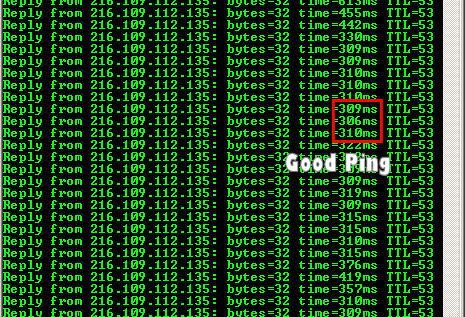
As you can see, it’s pretty constant around the 300ms mark, with no “Request timed out“.
Bad Ping
When I was in Brunei and people were using Peer to Peer software in the hotel, my connection looked like this:
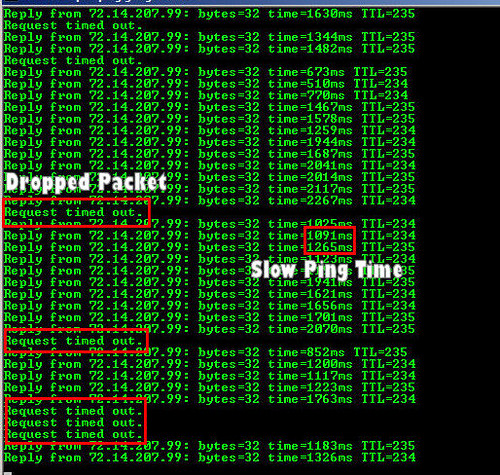
As you can see there are many “Request timed out” and high ping times.
Ok so how do I interpret this?
As you can see in the first either picture there are multiple similar lines in the format:
Reply from 64.233.187.99: bytes=32 time=300ms TTL=241
Reply from THE SERVER YOU PINGED bytes=SIZE OF PING time=PING TIME TTL=IGNORE
A ping is basically a packet containing a bunch of junk (1-10 and a-z) or something like that, a packet is just a small peice of data sent over the Internet.
When another machine receives your ping packet, it will send back a reply, the purpose of the ping is to time this whole process.
That’s the time= part shown above, the time taken for the packet you sent to get a reply.
So it’s a basic metric for the quality of service your Internet connection is giving you.
Request Timed Out
If you see the “Request timed out” shown in the Bad Ping section above, it means you got no reply at all, which is called a dropped packet. This is bad, and means there is a failure somewhere, and either your packet isn’t reaching the destination, or you aren’t getting a reply.
Ping Times
500ms = 1/5 second (1000ms = 1 second).
- A normal time for streamyx would be 250-300ms
- At peak times it seems to be around 500-600ms
- When it’s really bad its 800-1200ms
- If it’s above 1000ms trying restarting your connection
Ok, so how do I Ping?
Ok to ping something, go to the Start – Run menu option and type cmd:
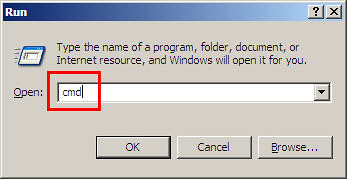
Then press enter, you’ll see a DOS prompt come up.
In the prompt type:
ping google.com -t
And press enter.
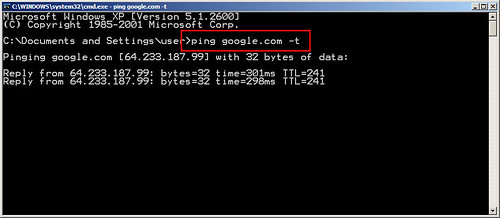
You’ll see the ping running, the -t argument tells it to ping constantly, so it won’t stop untill you press CTRL+C.
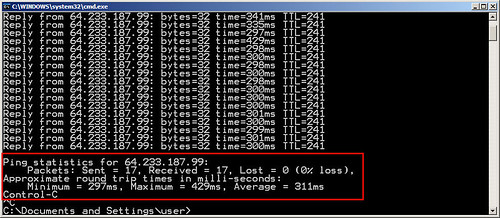
It’ll then give you a summary of the Ping statistics for that session.
You can also try pinging yahoo.com, I usually get slightly better times for Yahoo! than Google.
If you ping streamyx.com you should get something like 20-50ms.
If you want to read more about Ping and some of the options, check Wikepedia – Ping.


YEAY BEST EVAR TUTORIAL!
So when I order a Kopi Ping at the kopitiam, should I complain if it takes more than 1000 miliseconds to arrive?
i feel like damn clever now
FireAngel: Yah I know I’m like TEH AWESOME.
Chris: LOLROFLPLS That’s some funny shit right there.
kimberlycun: Well someone has to think you are clever 😀
i’ll say, the tmnet hotspot is even worse, at times its down to a few bytes per second, you cant even think of pinging coz all you get is request timed out notice. Its terrible, and this for just 7 users. really terrible.
enough with the Ping. teach us some real hacking already! 😛
Try Jaring broadband.
I have no problem with it so far. And I don’t mind paying for a lot of “no problem”s.
nothingnormal: Yah I can imagine, if they can be this bad with wires, imagine what they can do with wireless..
spiller: One day soon grasshopper.
eddyhan: Yeah I have considered that, if it doesn’t get better soon I will change. Are you using wired or wireless? What kind of pings do you get?
But no matter how I emcapsulate my packets the girls still give me a poison return … which makes my eyes go wobbly and I get a split horizon! Must work on my hardware to get a better response … maybe even get a physical layer!! D’oh!
Master Tiger, can you the teaches us 100 year-old ancient art of Port Scanning?
My village will pay you with 100 kilos rice. And chicken also. Young virgin can be arrangement.
*Kow tow*
Request Timed Out
If you see the “Request timed out” shown in the Bad Ping section above, it means you got no reply at all, which is called a dropped packet. This is bad, and means there is a failure somewhere, and either your packet isn’t reaching the destination, or you aren’t getting a reply.
Thats not entirely true. “Request Timed Out” by itself doesn’t conclusively tell you that there was no reply or that there is an error. It simply tells you that a request for a reply to the ping was not met in the specified ‘Time To Live’ or TTL.
For instance, if the TTL was 1500ms and the packet took 1501ms to arrive, “Request Timed Out” would show up, but technically the packet did get to you, just not on time.
I may sound like a nip pick, but i’m not. This diffrence is important because not all data is routed equally. This is because some data is time critical (streaming video, audio, gaming etc) and some are not (Bit torrent, FTP etc) so a router will route time critical packets ahead of non time critical packets.
For instance, from the same server to the same client, transfering the exact same video file, the packets containing the file if it were a video stream might go at say ~800ms but as a file transfer over Bit Torrent it might go at ~1600ms.
So from a ping standpoint, if your TTL were set to 1500, your computer would register all the Bit Torrent packets as dropped and you might assume there is something wrong with the network, but in fact the network is working as it should.
And sorry for talking so much 😀 Not saying you don’t know it, it’s for the benefit of ppl who always go OMGWTFBBQ TMNUT SUX everytime their pr0n download goes south.
Because Jaring uses TM’s backbone, you get the same ping just like SteamyX (gives me steam in my head..).
But the reliability is what I’m paying for. I am always able to connect to sg/tw/hk host’s in west servers without lagging at all. Plus of course, I have never got disconnected/RTO before at home.
I’m hybrid wired/wireless.
My friend from LYN influenced me to convert. Some of us already did. Sucky part is when you want to terminate the account, TM will charge the remaining months to complete the one-year contract we happily signed without looking.
Need to agree with Viceice’s last comment. 🙂
Some times bad wiring also will drive up the ping too. My ping came back to the “so called” normal rate after re-wiring of the telephone cables when I first got my broadband.
You’re god. Thanks for the tutorial dude. Haha. Keep it coming.. I never get bored of your entries
Viceice – Bryan – Just quickly in ST’s defence:
I think ST was keeping it as simple as possible. Not everyone needs to know the intricate details of the inner workings.
What ST said was basically what the teaching profession call ‘lies to children’ – a simplistic version of how things really work. When increased knowledge is needed they can learn it, or seek it out.
What you guys added was good too … just trying to stick it in perspective. If ST was to include every possibility we’d end up with a book as big as O’Reilly’s ‘Using Ping to discover where you left your pants’ or something. 🙂
Chris: Another subject for another day, will cover that 😀 Considered opening a new site devoted to that subject as people are ALWAYS asking me about it.
Viceice: It’s not meant to be a definitive guide, or a guide for technical people. What Dabido says is correct, as an educator sometimes you have to know the level of the audience and adjust your ‘output’ to match that, if not they drown in information and end up learning nothing. And what you said about TTL is wrong anyway, expired could lead to the request timing out, but that’s EXTREMELY unlikely, TTL is just desired to stop the situation when 2 routers are set up badly and keep sending packets to each other in an infinite loop. TTL is measured in hops and not in milliseconds, it’s defined by the TCP/IP stack of the operating system and not by the user or anything else. You can actually fingerprint the OS you are pinging with a combination of TTL and traceroute. And yah from what I can tell, TMNUT are somehow limited Bit Torrent so it doesn’t rape their whole shitty network. Thanks for the input anyway 😉
eddyhan: Ah thanks for the info man, I do keep an eye on LYN and dslreports Asia forums to see whats going on. I will consider it if things don’t seem to improve.
Bryan: Yah bad wiring does cause a lot of problems sadly. I’ve had the line checked though, it’s actually pretty good. It’s mostly a problem with the International peering running over-capacity and tmnut not paying to upgrade it.
victor: Thanks man 🙂 Glad you appreciated it.
Dabido: Bang on dude.
Well i stand corrected 😀
Anyway, i think TM’s limiting of BT has to do with a change in the BT spec.
By version 4.0.1 BT packets were flagged as ‘Bulk’ to aid package shaping.
https://www.bittorrent.com/bittorrent_versions.html
Hey ST thanks for teaching us such useful tips for hacking!! >:P
ping is a basic metric (good for normal users), but not the one that ISPs should be relying on. smokeping will give a better indication of quality of service,