
Recently I’ve received quite a few Phishing scam e-mails pretending to be from Maybank, of course I’m not even a Maybank customer.
For those that don’t know, Phishing is:
In the field of computer security, phishing is the criminally fraudulent process of attempting to acquire sensitive information such as usernames, passwords and credit card details by masquerading as a trustworthy entity in an electronic communication. Communications purporting to be from popular social web sites (YouTube, Facebook, MySpace, Windows Live Messenger), auction sites (eBay), online banks (Wells Fargo, Bank of America, Chase), online payment processors (PayPal), or IT Administrators (Yahoo, ISPs, corporate) are commonly used to lure the unsuspecting.
It looks like one of my e-mail addresses has gotten onto some local Malaysian scam/spam e-mail list. Thankfully it’s not my normal mail, it’s one I use for signing up to sites and for places likely to generate junk.
The e-mail which supposedly sent the phishing mail was “Maybank (maybank@security.com.my)” with the mail looking as follows:
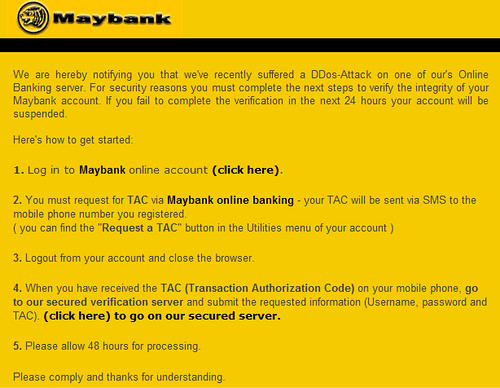
The text is as follows:
We are hereby notifying you that we’ve recently suffered a DDos-Attack on one of our’s Online Banking server. For security reasons you must complete the next steps to verify the integrity of your Maybank account. If you fail to complete the verification in the next 24 hours your account will be suspended.
Here’s how to get started:
1. Log in to Maybank online account (click here).
2. You must request for TAC via Maybank online banking – your TAC will be sent via SMS to the mobile phone number you registered. (you can find the “Request a TAC” button in the Utilities menu of your account)
3. Logout from your account and close the browser.
4. When you have received the TAC (Transaction Authorization Code) on your mobile phone, go to our secured verification server and submit the requested information (Username, password and TAC). (click here) to go on our secured server.
5. Please allow 48 hours for processing.
Please comply and thanks for understanding.
***This is an automated message, please do not reply***
The actual link in the e-mail is https://mail1.irs-usa.com/ – which was a fairly legitimate looking Maybank login page. It appears the site has been taken offline now, it seems like it’s some kind of Chinese business and the email server was hacked.
The terrible grammar should give you a warning bell in your head that this probably isn’t a legitimate e-mail.
When you visit the site (Using Firefox, IE gives no such prompt) you will get the Phishing warning:

Another good reason to use Firefox right?
Maybank users will be particularly prone to falling for this, and they even ask for the TAC code – so the access they will have will be dangerous.
Do warn people about these kind of e-mails, they weren’t an issue when we were receiving Phishing scam mails from Chase America and Capital One – but now they are being localised they are a real threat.
There is some info from Maybank here and a way to report Phishing e-mails on the same page.


Got this about 1 or 2 weeks back, it seemed pretty real to me but in the end, brushed it off thinking that it could some kind of scam
Hm.. never gotten one myself but instead got one for CIMB bank and likewise, am not a CIMB customer.
I just do hope that most people using online banking read their banks alert messages and avoid logging in direct from email links as most banks do not even contact their customers through email.
Apparently my professor in the UK did mention about this and she actually gets over 10 phishing emails per day. Guess Malaysia still has rather low fraudulent emails compared to elsewhere.
David: Yah I got another one shortly after, exactly the same language but for Ambank. Good job you brushed it off.
moons: Yah it’s hit and miss but they do seem to be country specific at least so their e-mail harvesting is accurate.
I am not sure if its a good thing to link to the scam…. I think Google might penalize the website for “linking to a bad neighborhood” as they call it.
Usually when I get those emails, I hover over my mouse to see the true url address.
Joey Logano: Well I don’t rely too much on search engine traffic it’s not too much of an issue.
I have encountered this same problem. Kept getting this Maybank e-mails in my work e-mail address. I got so sick and tired one day and i clicked the reply button and said that Maybank DOES NOT have my current work e-mail address as i have not updated it in more than a year and to stop spamming me. Guess what…it stopped after that….hahhahahaha
If you guys received any suspicious email that regards to phishing. Just forward it to cyber999@cybersecurity.my. Cheers!