
Before:
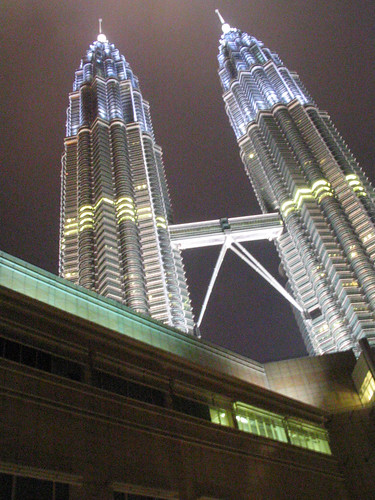
vs.
After:
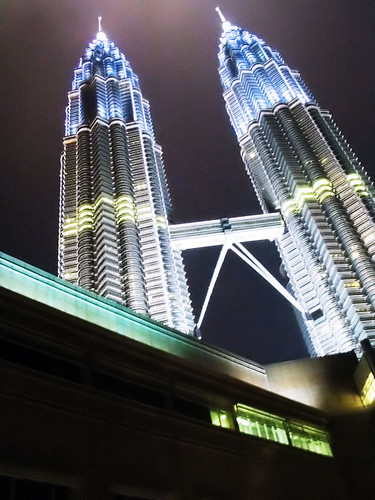
Best appreciated in large format.
If you understand Photoshop at all, here’s what was done:
1- Go into LAB mode.
2- Duplicate background.
3- Use “smart blur” and “surface blur” at different settings on each channel to get rid of the noise. You will be losing details.
4- Go back to RGB mode.
5- Adjust the opacity of the blurred layer to bring back some details from the original. You can even use the eraser to work on problem areas.
6- Create two “Photo Filter” layers.
7- Set one of these two adjustment layers to “Overlay.” This will give you deeper shadows and change colors all at once.
8- Play with the opacity of the two adjustment layers.
9- Duplicate the blue area from the towers’ tips.
10- Use “Gaussian Blur” on this new layer. The towers and the sky are glowing but it’s too much.
11- Change opacity. Now it’s better and more natural.
12- Add another adjustment layer, this time it will be “Curves.”
13- Make a slight S curve.
14- Flatten
15- Sharpen


Yea..Photoshop is an amazing piece of software.
Like this guy’s 15,000 layered .psd file!
https://www.bertmonroy.com/fineart/text/fineart_damen.htm
Yeah layering seems to be the way to go for making techno music (although it may not be called layering, but can’t wait to get my hands on a program like that), animation and doing drawings. Make a mistake in a program without layering like Microsoft Paint and you’re there for another half an hour or so. But with layering, it’s so much faster and easier.
Some say you could also play with Blend If sliders but they’re more headache related. LoL!
were u the angmoh who was lying on the floor of suria to take that pic? do u notice that alot of ppl look up when they goto the twin towers area? ROFL
eztuts: Yah that guy is truly awesome!
JC: Yeah it’s the same way for most creation processes as then it’s much easy to edit a single drum loop in the music rather than mix everything again, same for graphics, engineering design etc.
lex: Nah wasn’t me, just crouched next to a lamppost to stay steady.