
It’s actually very easy, I forgot how to do it though, so I had to work it out again.
I think last time for my T610 I phoned them up and they sent me the service settings.
This time though I tried online, my first attempt failed as I tried through the SMS service 22333 number, which didn’t recognise my model.

It only recognises a few models.
So I spotted a link there “Via Web” on this page here.
That’s the way I suggest you try, it’s very easy indeed.
Just select which services you wish to configure (usually GPRS and MMS) your phone model and your phone number, and that’s it! It has k750c in the drop-down, so that’s perfect.
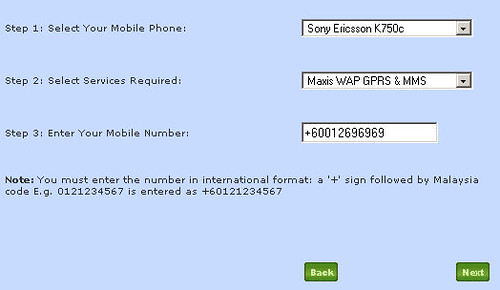
After a minute or so you’ll receive 2 messages, accept the settings, then you are ready to send MMS and browse the web with GPRS!


Is that your phone number? You’re pretty sure you will not be getting the likes of Maryam Obocha and Elie asking you to join their scam after revealing it here?
Sorry cuckoo me. It has only 6 digit. I should probably get my eyes checked.
howsy: Hahaha no way dude, I wouldn’t publish my number here. Might get Xia Xue calling me to profess her love..
Yeah. She might be longing want to do a ’69’ with you. LOL!
Cool. I have been looking for this setup information.
Eh, my sister was asking about this a couple of days ago, but I didn’t know how to answer her. Well, now that you’ve answered it, I’ll forward this blog post to her.
Thanks for the info, Master Tiger!
If post paid customer just call 123 and get them to send the settings.